
Most Azure bills carry more than they need to. That is rarely anyone's fault. Resources are created for a project and never removed, machines are sized for a peak that never came, and test environments run through the night and the weekend because nobody switched them off.
The harder question is who is supposed to notice. In our earlier article Cloud cost management, not all you can pay we pointed at an awkward fact: the party that sells you Azure usually earns more when you use more of it.
Why it matters who looks at your bill
Many organisations buy Azure through a Cloud Solution Provider, often together with Microsoft licences. That is a perfectly good way to buy. But a reseller whose margin grows with your consumption is not the obvious party to tell you that a third of it can go.
We do not resell CSP subscriptions, licences or Azure consumption. Our work is building and running Azure platforms and data estates, so our interest is a platform that does what it should at a cost that makes sense. You keep your current CSP and contracts. We only look at what you use and how.
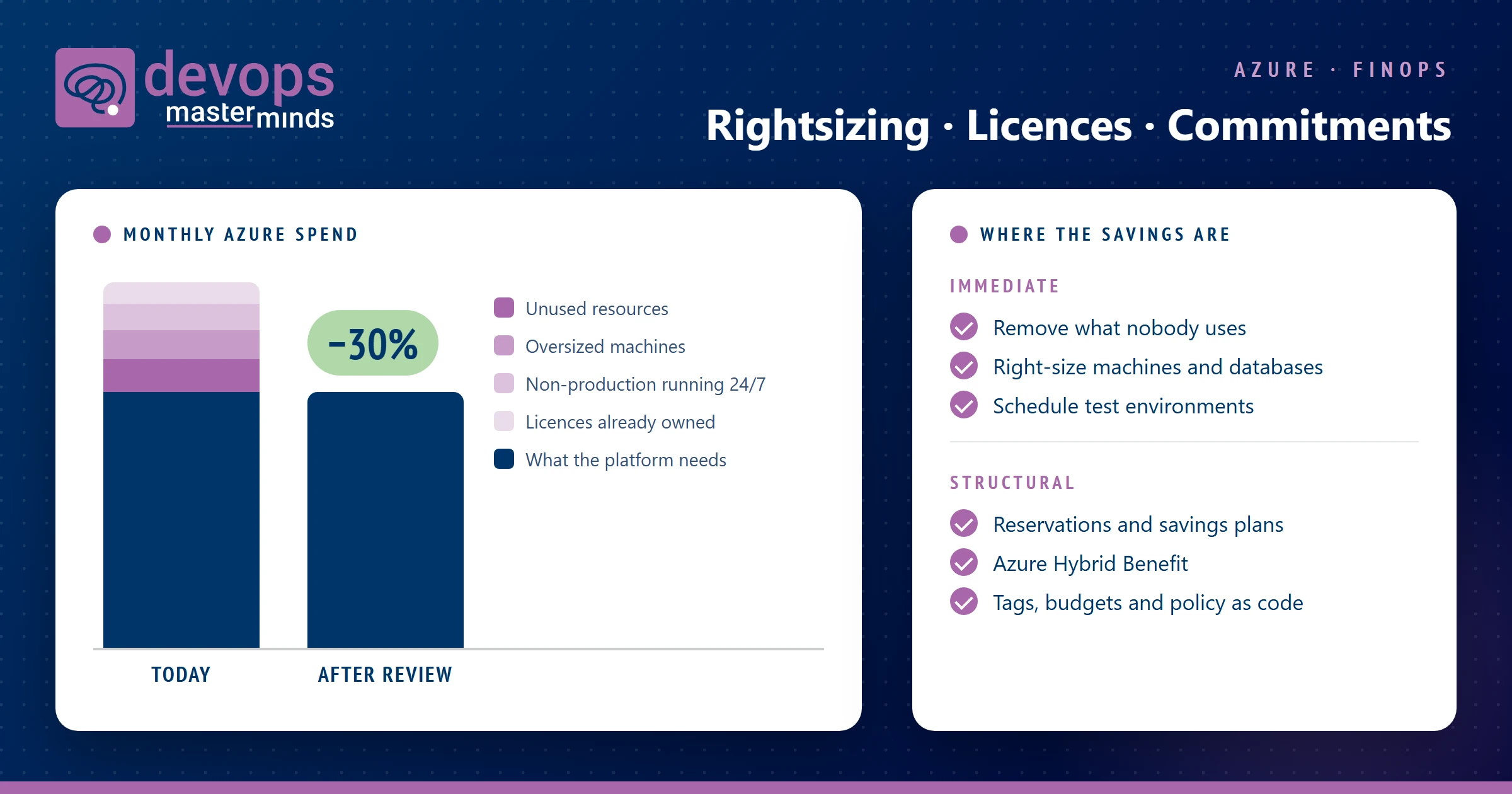
In the environments we review, we often find around 30% of the monthly spend that can go. Part of it can go straight away. The rest needs structural changes, and those are the savings that last.
Immediate savings
These are the changes that take days or weeks, not projects:
- Resources nobody uses. Unattached disks, old snapshots, public IP addresses, idle load balancers and forgotten test environments. We wrote about the hidden costs of orphaned resources before.
- Oversized machines and databases. Sizes chosen at migration time and never revisited, while the metrics show a fraction of the capacity in use.
- Non-production running around the clock. Development and test environments that only need office hours.
- Logging and storage nobody reads. Diagnostic data sent to Log Analytics in full, and data kept in a storage tier it no longer needs.
Structural savings
Immediate savings come back if nothing else changes. The larger and more durable part sits in how the platform is bought, licensed and run:
- Commitments that match real usage. Reservations and savings plans lower the price of steady workloads, but only after the sizing is right. Committing to an oversized estate locks in the waste for one or three years.
- Licences you already own. Azure Hybrid Benefit lets you use existing Windows Server and SQL Server licences in Azure. It is often available and not switched on.
- The right SQL Server edition. For SQL Server on Azure virtual machines the licence is frequently a larger part of the bill than the machine itself. Our SQL Server cost calculator splits an estimate into machines, Windows and SQL licences, and shows which reductions are worth checking.
- Ownership and visibility. Tags that say which team and product a resource belongs to, budgets with alerts, and cost reports a product owner can read without learning the Azure portal.
- Guardrails in the platform. Infrastructure as Code and Azure Policy keep new resources tagged and sized within agreed limits, so the next project does not quietly rebuild the waste. Microsoft's open source FinOps toolkit helps make the reporting part repeatable.
Keeping the savings
FinOps is not a one-off clean-up. It is a habit: someone looks at the numbers every month, changes are made through code rather than by hand in the portal, and the people who spend the money can see what they spend.
That is also where independence helps. The advice to shrink a reservation, turn off a licence or move a workload to a cheaper service is easier to give when nothing we sell depends on it.
How we start
We start with read-only access to your cost data and resource inventory. You get a short report with the changes that can be made straight away, the structural changes with their expected effect, and what is needed to keep the savings in place. Your CSP and existing contracts stay as they are. See Cloud Cost Optimisation for how the work runs.
Curious what your Azure bill is carrying? Get in touch, or take a first look at your SQL Server costs with the cost calculator.