

Upgrading to SQL Server 2025? Check your certificates before your replication breaks
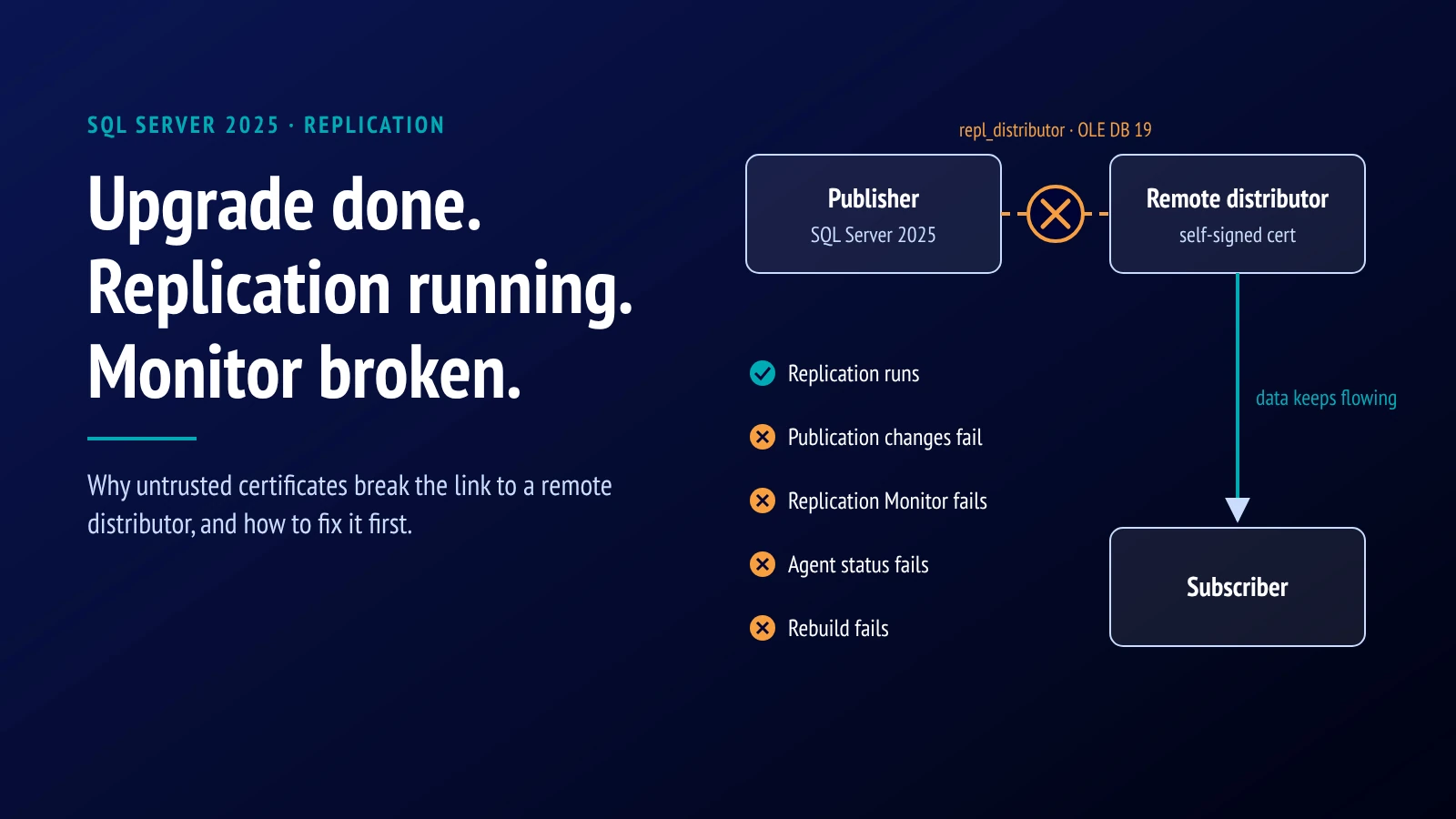
Your SQL Server 2025 upgrade finishes. Replication keeps moving data. Nobody complains.
Weeks later, someone opens Replication Monitor during an incident, and it doesn't work. Or they try to add an article to a publication, and it fails. If they try to rebuild the distributor, they get this:
OLE DB provider "MSOLEDBSQL19" for linked server "repl distributor" returned
message
"Client unable to establish connection"
SSL Provider: The certificate chain was issued by an authority that is not
trusted.
The upgrade isn't the real cause. The cause is the certificate your instances have used for years, and the fact that SQL Server 2025 now checks it.
If you run replication with a remote distributor on SQL Server 2016, 2017, 2019 or 2022, this post shows you how to find out whether you're affected and what to fix before you upgrade.
What changes in SQL Server 2025
SQL Server 2025 uses the Microsoft OLE DB Driver 19 for internal server-to-server connections. Its defaults are strict: every connection is encrypted (Encrypt=Mandatory), and the server certificate is validated (TrustServerCertificate=False).
The older OLE DB Driver 18 did not encrypt by default. So many environments ran for years on the self-signed certificate that SQL Server creates at startup. Nobody noticed, because nothing checked it. Now something does, and a self-signed certificate fails that check.
The connection that matters here runs between the publisher and a remote distributor. Internally it goes through a linked server called repl_distributor. After the upgrade, that linked server uses the new, stricter defaults. If the distributor's certificate isn't trusted, the publisher can no longer reach it the way it used to.
Are you affected?
Microsoft lists this in the breaking changes for SQL Server 2025. You are affected when all three of these are true:
- The instance is configured as a publisher .
- The topology uses a remote distributor (the distributor runs on another instance).
- The instance does not have a trusted certificate.
A local distributor, with publisher and distributor on the same instance, is not affected. But Availability Groups require a remote distributor. So the larger, more critical environments are the ones most likely to be hit.
Fix it before you upgrade
The good news: you can do all of this on your current version. Microsoft explicitly recommends solving it up front. SQL Server 2016 to 2022 work fine with CA-issued certificates, so this is not part of the upgrade. It's a small project you finish first.
What the certificate needs
- Trusted issuer: the certificate comes from your internal PKI (for example Active Directory Certificate Services) or a public CA. The CA chain must be trusted on every replication participant and on every machine that runs replication agents.
- Matching names: every name used to connect is in the Subject or the Subject Alternative Names. That includes the FQDN, the short name if you use it, and in A vailability Groups the listener name on all replicas.
- Right purpose: Enhanced Key Usage "Server Authentication"
- Permission: the SQL Server service account can read the private key .
- Assignment: the certificate is assigned to the instance, and the SQL Server service was restarted afterwards.
Upgrade order
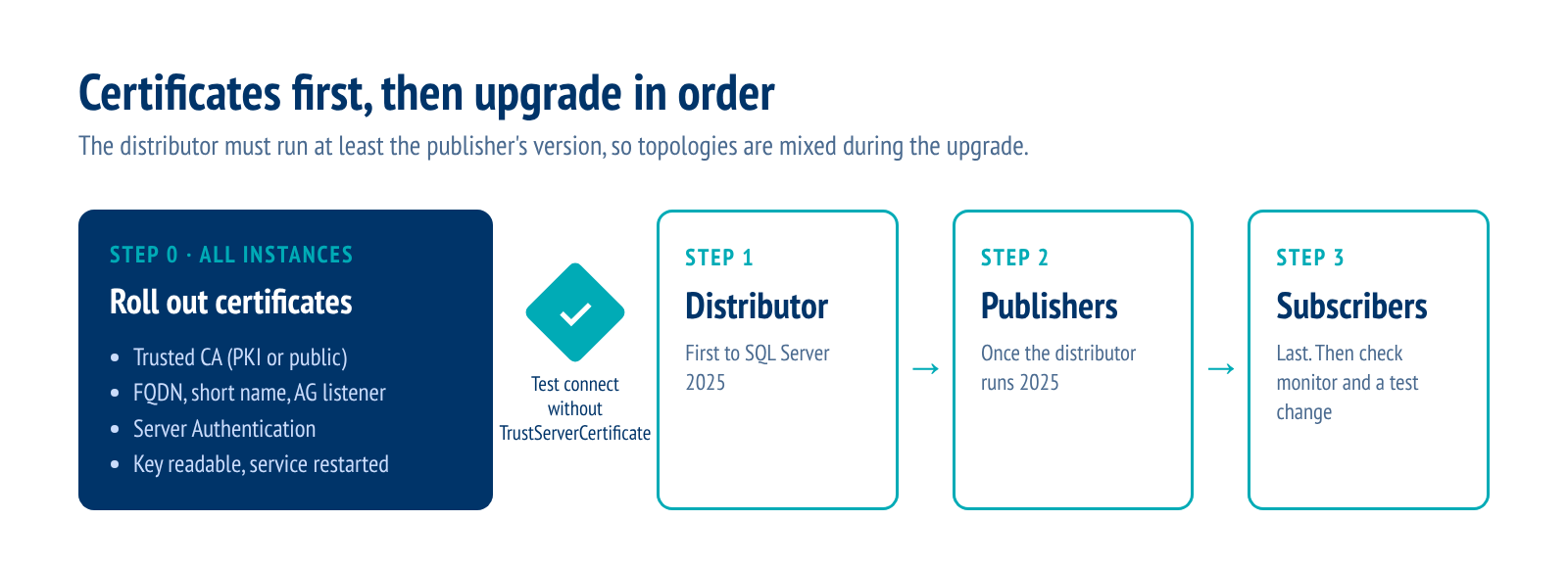
The usual replication rule still applies: the distributor must run at least the same version as the publisher. So you upgrade the distributor first, then the publishers, then the subscribers.
That means you will run mixed topologies along the way, for example a distributor on SQL Server 2025 with publishers on 2019. Roll out and test the certificates on every instance before the first upgrade step, not only on the instance you upgrade next.
Your checklist
- Map the replication topology: which instances are publishers, distributors, subscribers? Where is a remote distributor in use?
- Check the current certificates: which certificate does each instance use, who issued it, when does it expire?
- Request PKI certificates with all required names and assign them.
- Test connections without TrustServerCertificate before the upgrade starts.
- Upgrade in this order: distributor , publishers, subscribers.
- After the upgrade, check Replication Monitor, Agent status and a test change to a publication.
- Add certificate expiry dates to your monitoring. From now on, an expired certificate stops replication.
Script it with dbatools
Most of these steps can be scripted with dbatools and run against many instances at once:
$instances = 'SQL01','SQL02','SQLDIST01'

1. Topology: who is publisher, who is distributor?
Get-DbaReplServer -SqlInstance $instances |
Select-Object SqlInstance, IsPublisher, IsDistributor, DistributionServer

2. Which certificate does each instance use?
Get-DbaNetworkCertificate -ComputerName $instances

3. Certificates in the store, with issuer and expiry date
Get-DbaComputerCertificate -ComputerName $instances |
Select-Object ComputerName, Subject, Issuer, NotAfter, DnsNameList,
Thumbprint

4. Assign the PKI certificate (restarts the service - plan a maintenance
window!)
Set-DbaNetworkCertificate -SqlInstance SQLDIST01 -Thumbprint '<Thumbprint>'

5. Test like OLE DB 19 does: encrypted, with certificate validation
Connect-DbaInstance -SqlInstance SQLDIST01.company.local -EncryptConnection |
Select-Object Name, VersionString
If step 5 fails with a certificate error, replication would fail after the upgrade too. That makes it a simple readiness test: run it against every instance, and you know where you stand before you touch anything.
It's not just replication
The same change affects linked servers that use OLE DB Driver 19 on SQL Server 2025, and log shipping monitoring with a remote monitor. Fix the certificates once, and you've fixed them for the whole instance. One separate change to plan for: existing full-text indexes need to be rebuilt after the upgrade.
The emergency switch, and why it isn't a fix
If replication is already broken after the upgrade, Microsoft offers a switch. It makes the distributor accept self-signed certificates:
EXECUTE sp_changedistributor_property @property = N'trust distributor_certificate'. @value = N'yes';
When you rebuild replication, the same option exists as a parameter of sp_adddistributor (@trust_distributor_certificate = 'yes').
The connection stays encrypted, but the server's identity is no longer verified. Someone on your network could pose as the distributor. Microsoft itself calls this option less secure.
Use it to get back on your feet after a surprise outage. Then roll out proper certificates and switch it back with @value = N'no'.
The takeaway
SQL Server 2025 makes encrypted, validated connections the default. That's a real security gain, but replication needs preparation for it. If you run SQL Server 2016 to 2022 today , treat certificates as their own project before the upgrade:
- Inventory: where do you run publishers with a remote distributor?
- Rollout: assign PKI certificates to every instance involved.
- Test: connect without TrustServerCertificate.
- Upgrade: distributor first, then publishers, then subscribers.
That way the upgrade stays a planned step, not a troubleshooting session weeks later.
Planning your move to SQL Server 2025 and using replication, linked servers or log shipping? We check your environment with an automated assessment and give you a concrete upgrade plan. [Get in touch.]
Sources
Breaking changes to Database Engine features in SQL Server 2025 (Microsoft Learn)